What’s New
Sign Up HERE To Receive Fusionware Website Updates & Announcements
March 2026: Label Groups
- We have added the option to create a Label Group in the Product Settings.
- The Label Group has also been added as an option in the Auto Fees.
- You can assign several labels to a label group. When you add that group to an Auto Fee, as long as a product with one of those labels is on an order, it will apply that label group Auto Fee trigger.
March 2026: Variety Groups
- We have added the option to create a Variety Group in the Product Settings.
- The Variety Group has also been added as an option in the Auto Fees.
- You can assign several varieties to a variety group. When you add that group to an Auto Fee, as long as a product with one of those varieties is on an order, it will apply that variety group Auto Fee trigger.
March 2026: SSCC # Barcode Scanning
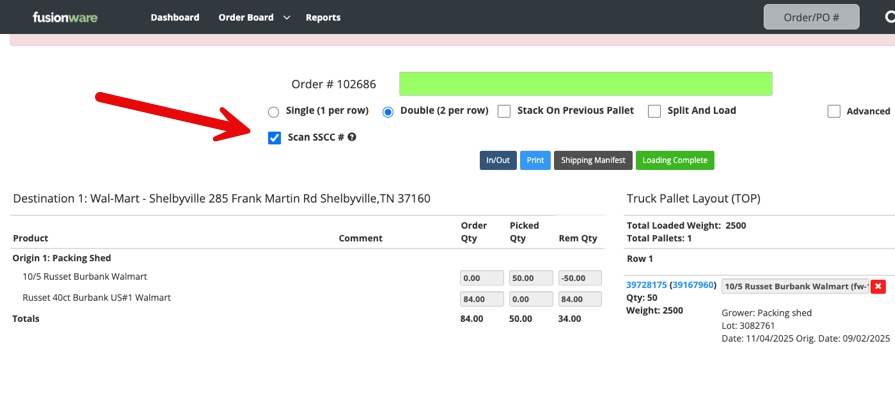
- Added the option to turn on SSCC barcode scanning in the Load Truck section.
- Select the “Scan SSCC#” checkbox and then scan the pallet tag like normal.
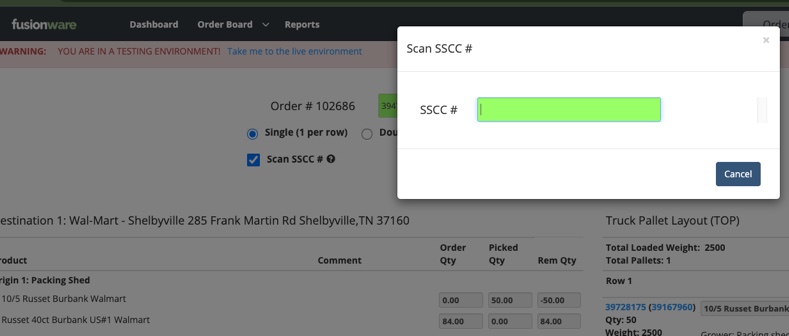
- A new modal will pop after scanning the pallet tag to scan the SSCC# barcode before loading the pallet.
- The SSCC# must match whats on the pallet tag.
March 2026: Order Product Line Zero Quantity Highlights
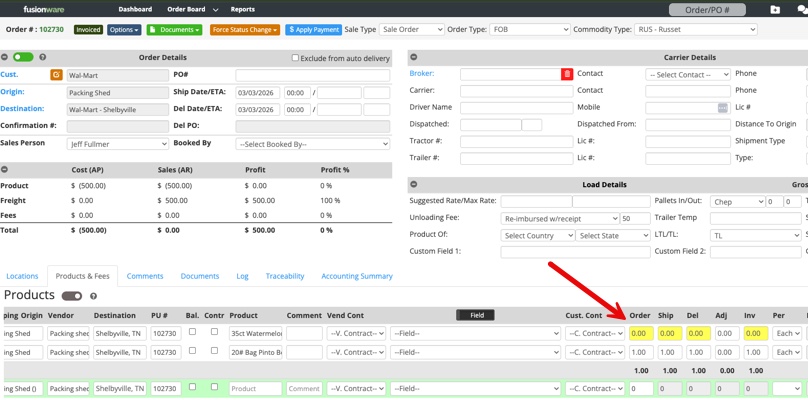
- Zero quantity in each product line will highlight yellow when past that order status
- An example would be if an order is In-Transit and the Ship qty. is still zero, the zero qty will be highlighted yellow.
February 2026: Company Groups
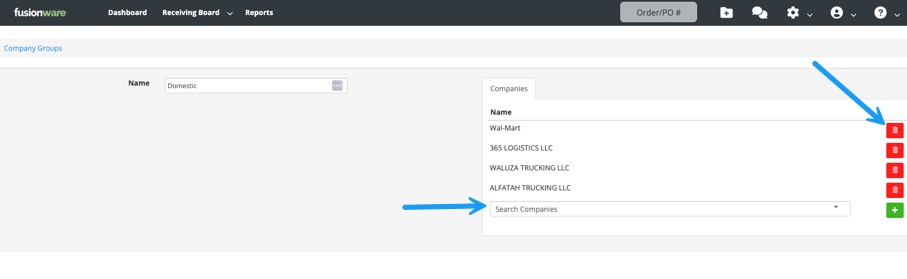
- Can group companies together under one group name.
- Added the ability to add companies directly in the Company Group edit section and also review/delete companies off the list.
February 2026: Auto Fees Updates
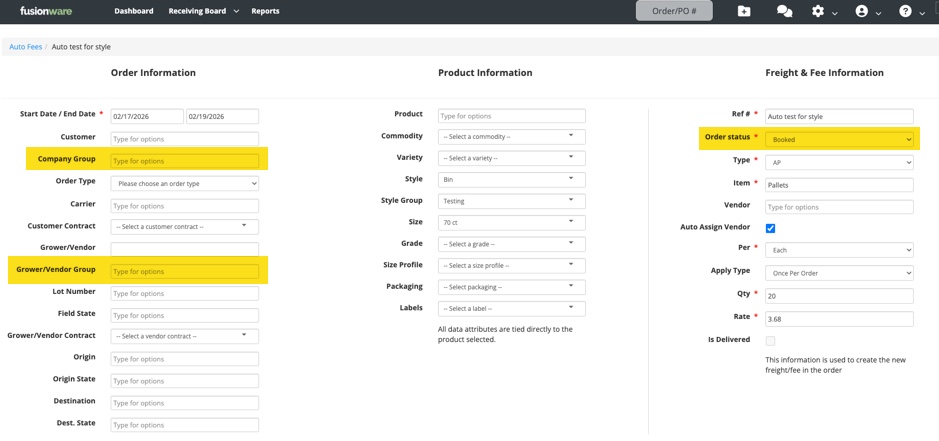
- Order Type (FOB, Delivered, Etc) added as a variable when setting up an auto fee.
- Company Groups added to auto fees as well
- Vendor Groups added to auto fees as well (Vendors that are part of a Company Group, search by Company Group.)
February 2026: Mobile App Forms Update
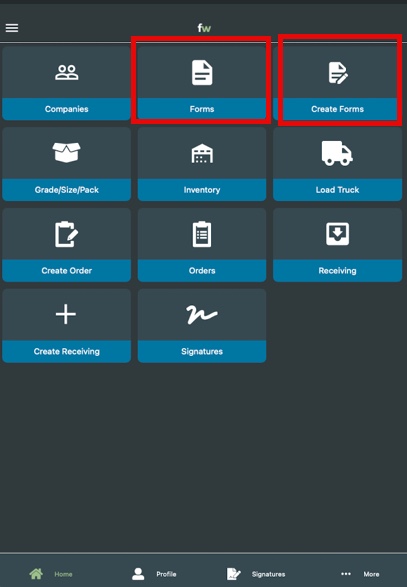
- You can now view and edit previously submitted forms, along with the existing functionality of creating forms.
- The user must have the forms permissions turned on for their user to see the new forms buttons.
February 2026: Receiving Report Updates
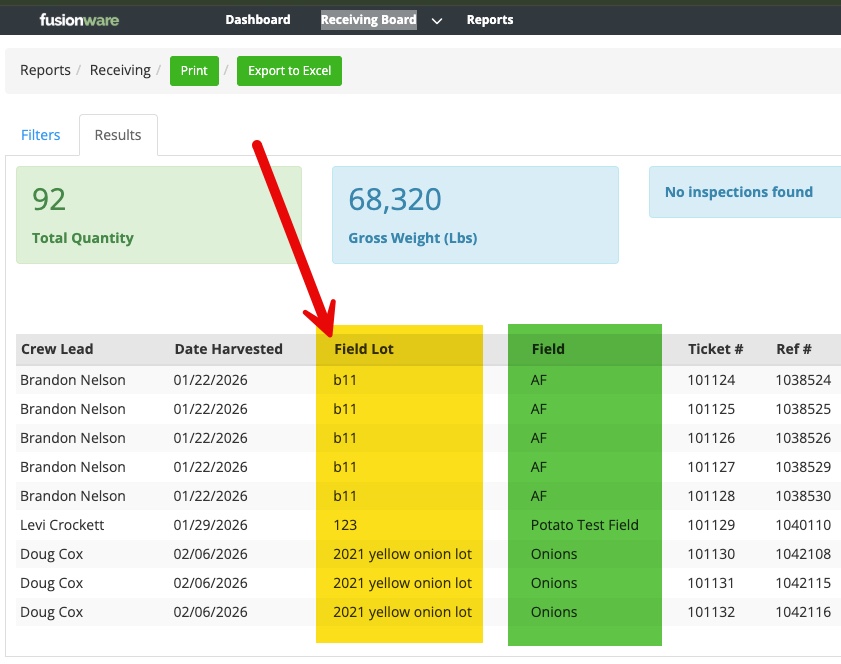
- Added a new column “Field Lot”, the lot name, from the Receiving to the report
- Fixed the “Field” column to be the actual field name from the Receiving.
February 2026: Receiving Weight Bug Fix
- Fixed receiving weights on the heavy weight & light weight fields to update the Product Weight live, without a refresh.
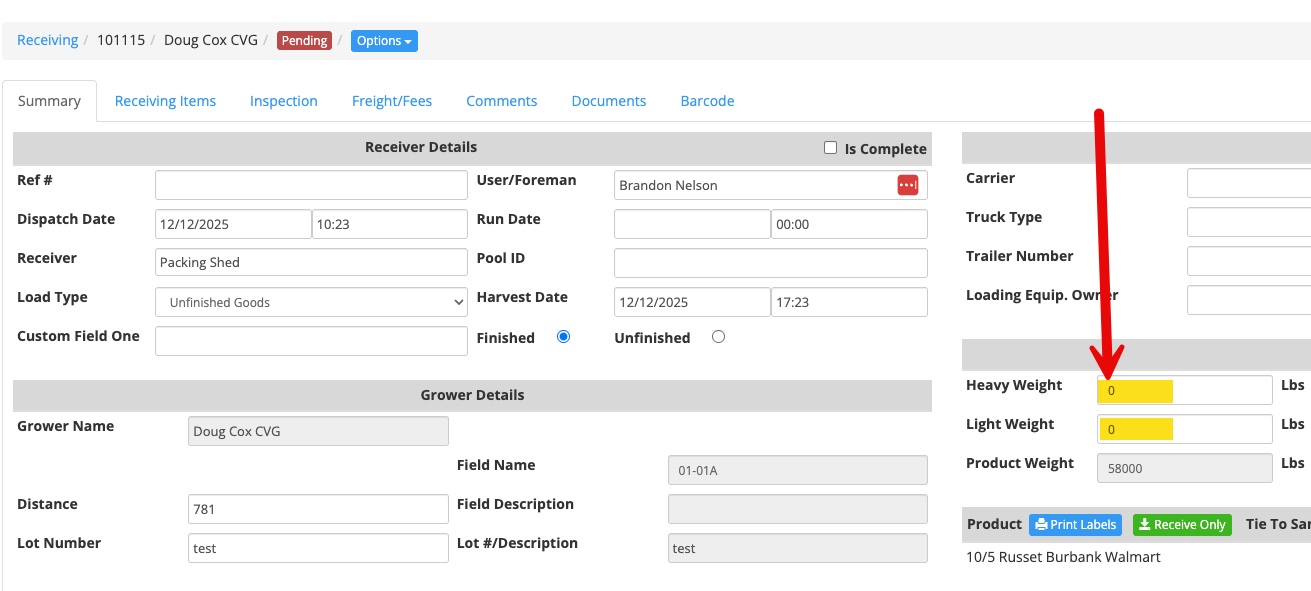
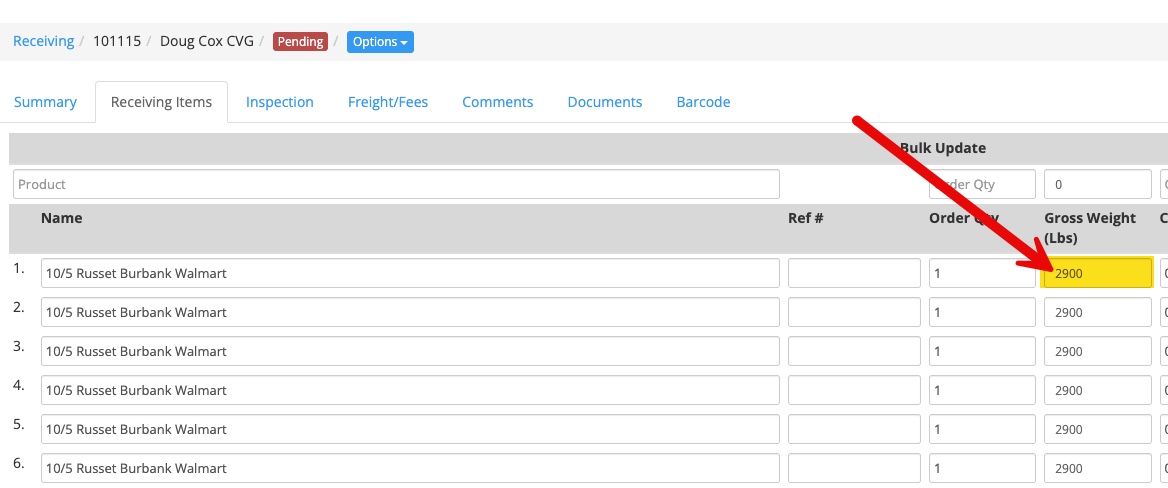
February 2026: Receiving Details Weight Edit logic Fixed
- Adjusting receiving weight details manually, is only available when heavy weight and light weight are set to zero.
February 2026: Shipped Sold Allocated Inventory
- Inventory that has been allocated to an order now shows up on the Shipped Sold report.
January 2026: Create New Transfer Orders from Service Failures
- On orders with a service failure and inventory loaded on that order, there is a new button to transfer the service fail items to a new order.
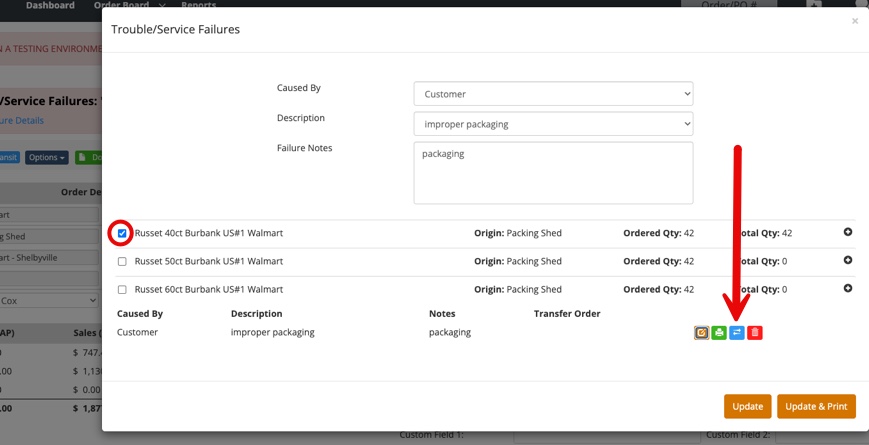
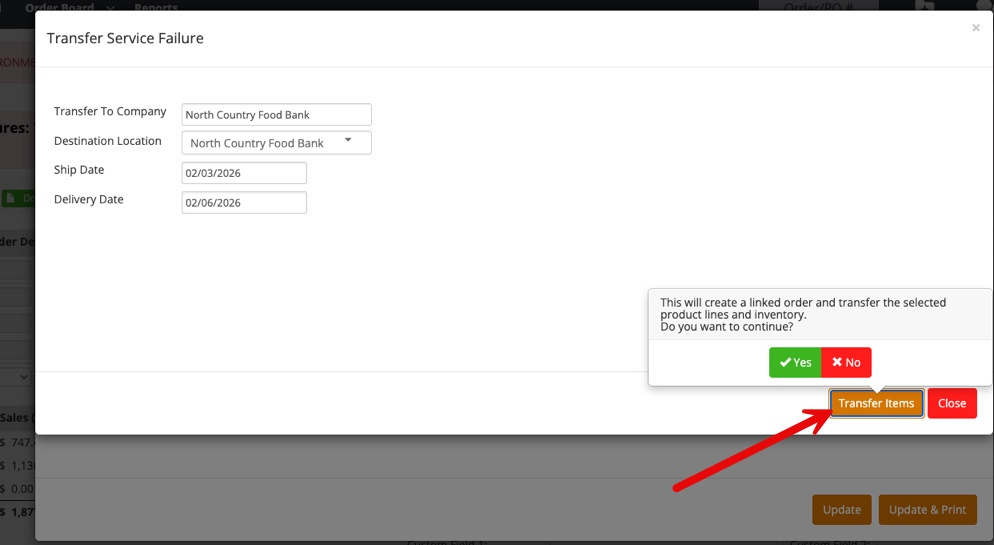
- Fill in the new form and transfer the items.

- A new order will be linked to this order with the failed inventory tied and loaded onto it.
- The new order created will always be a transfer order.
- The original order’s destination will be the origin on the new order as a transfer location.
- A transfer location can now be used as the origin if the order is a transfer order.
January 2026: Product Style Groups
- We have added style grouping to the products settings, below Styles, called “Style Groups”.
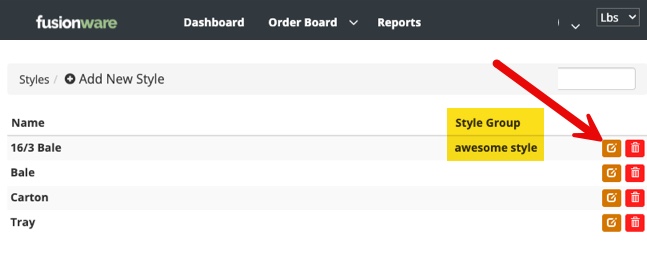
- This allows you to group multiple Styles to one Style Group.
- Go to Settings >> Products >> Style Groups to add a new Style Group name.

- Go to Styles and you can edit an existing style or when you create a new one add the Style Group.

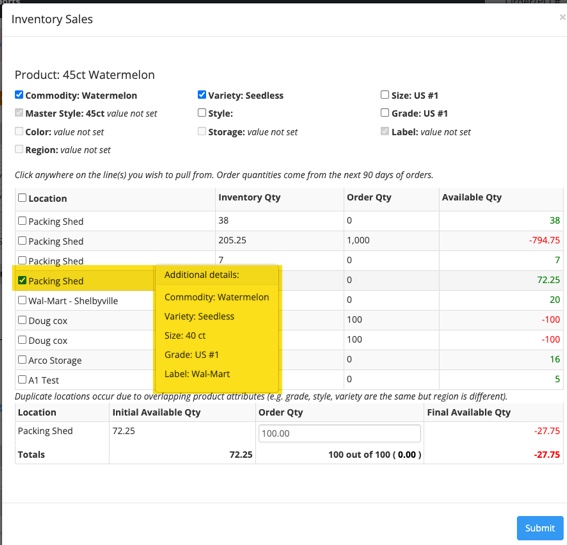
January 2026: Orders Inventory View Modal
- On the far right of the product line in an order is a new button to give a view of the current available inventory associated with that product.
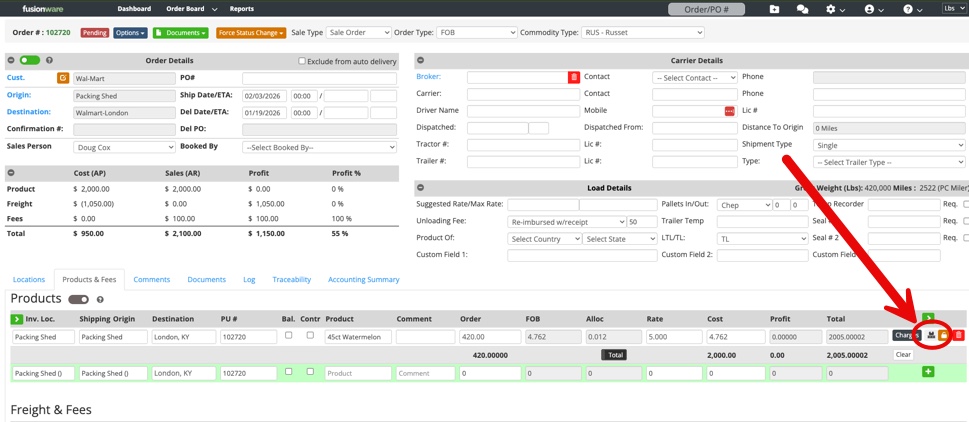
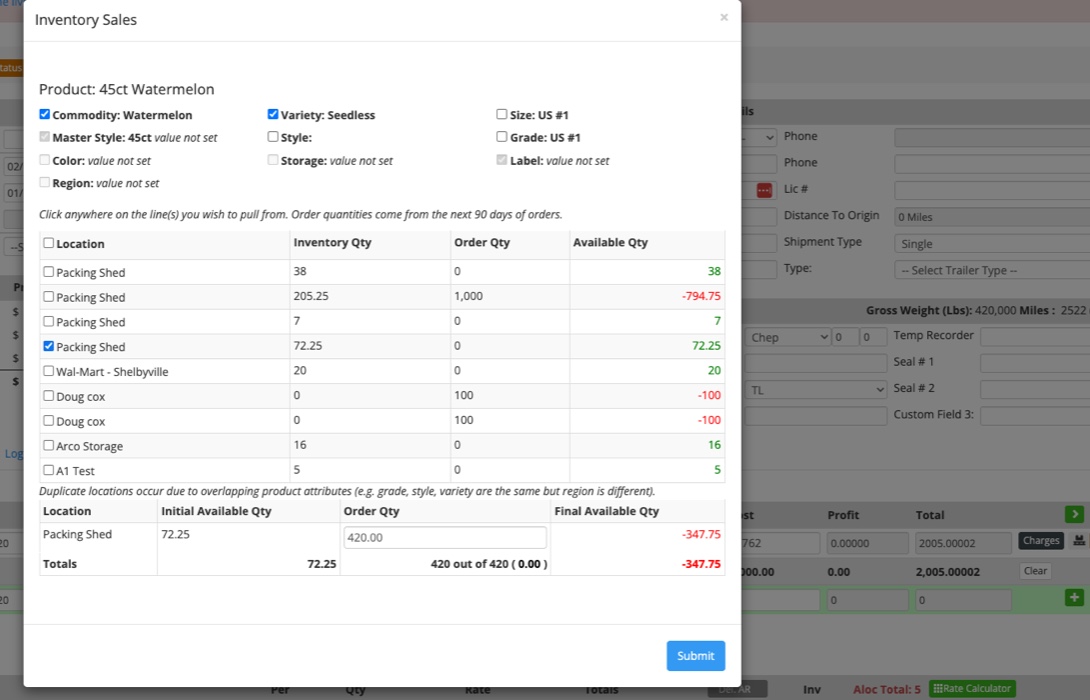
- Once clicked, this new modal will give a view of available inventory and locations.
- Inventory displays are based on broad product categories that you select in the top section.
- You can update the origin location or product line qty in the modal. This will update those parameters on the order when you press submit.
- On the bottom row you can see what inventory would be left at the selected locations with the current order.

- Hover on each location line to see specific filtered product category variations.

January 2026: Orders Product Line Column Adjustment
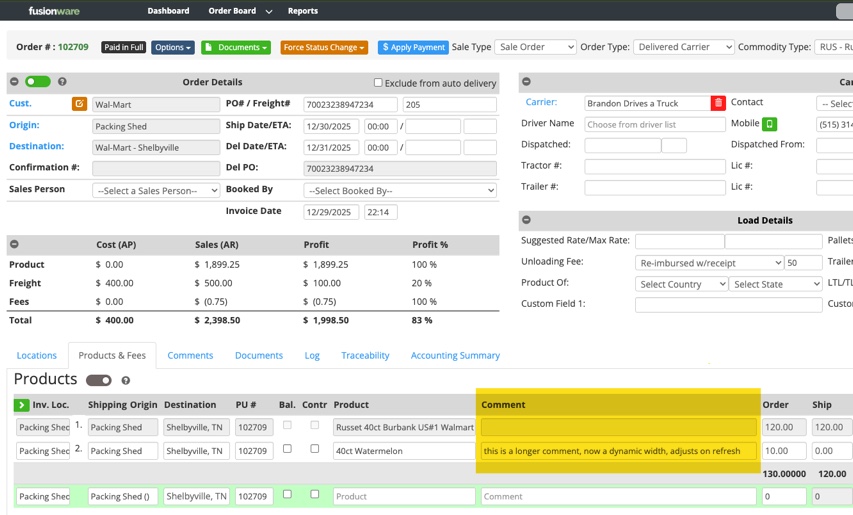
- In an order, several columns on the product lines are now dynamic.
- This will help to reduce the need to side scroll.
- Currently, a refresh is required for the column width to adjust
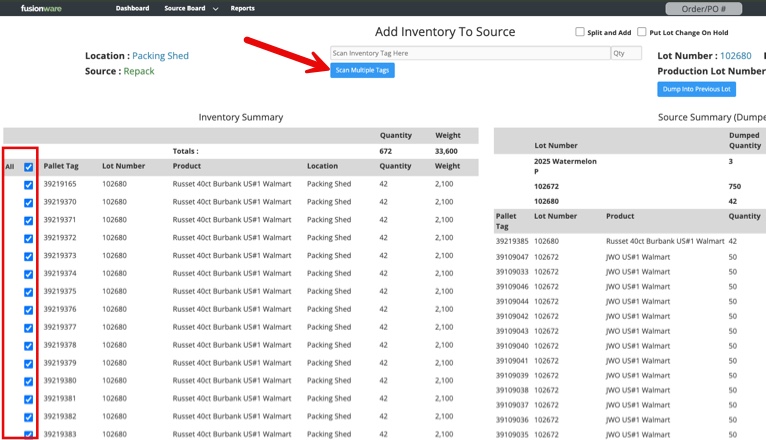
January 2026: Multi-Dump on Add Inventory to Source
- There is now an “All” select option for available inventory to dump.
- After scanning and dumping the first tag in a new lot, the other available tags to dump will show up for that same lot.
- Once one or more boxes are selected, the “Scan Multiple Tags” button shows up.
- Select it to dump all selected tags.
- Manual check/uncheck can be done as well.
December 2025: Source Board Dumping Updates
- In the Source Board Dumping page, dumped & packed columns have been updated and new metrics added.
- All column data is based on each lot and what was dumped or packed since midnight.
- Columns:
- Dumped Quantity: Units of inventory/bins/pallets/ dumped into a source
- Dumped Weight: Weight of total units dumped
- Packed Quantity: Finished pallets/units produced from a production line from the same source & lot.
- Packed Weight: Finished pallets/units total weight produced from a production line from the same source & lot.
- %: Percentage of the “Dumped Quantity” for each lot that has been packed as finished goods “Packed Quantity” since midnight.

December 2025: Packaging Default Rate Added
- Default rate for packaging has been added
- This is used for setting rates on the order when selling

December 2025: Documents Save Button
- In the Order Documents print/email preview there is now a “Save” button so you no longer have to print or email the document to save it to the documents tab inside the order
December 2025: Load Inventory From Inventory Report
- Inventory can now be manually loaded onto on order from the Inventory Report
- Filter down to the inventory you want to load
- Select all inventory with the same product
- Select the Options button then Load button
- Enter the order number (product name must match what’s on the order and qty. must not exceed the order) then press load


December 2025: Shipper Documents Contacts
- The vendor contacts on an order now pull into the shipper documents contact list when emailing the document.
- Shipper Confirmation
- Single Shipper Confirmation
- Shipper Settlement
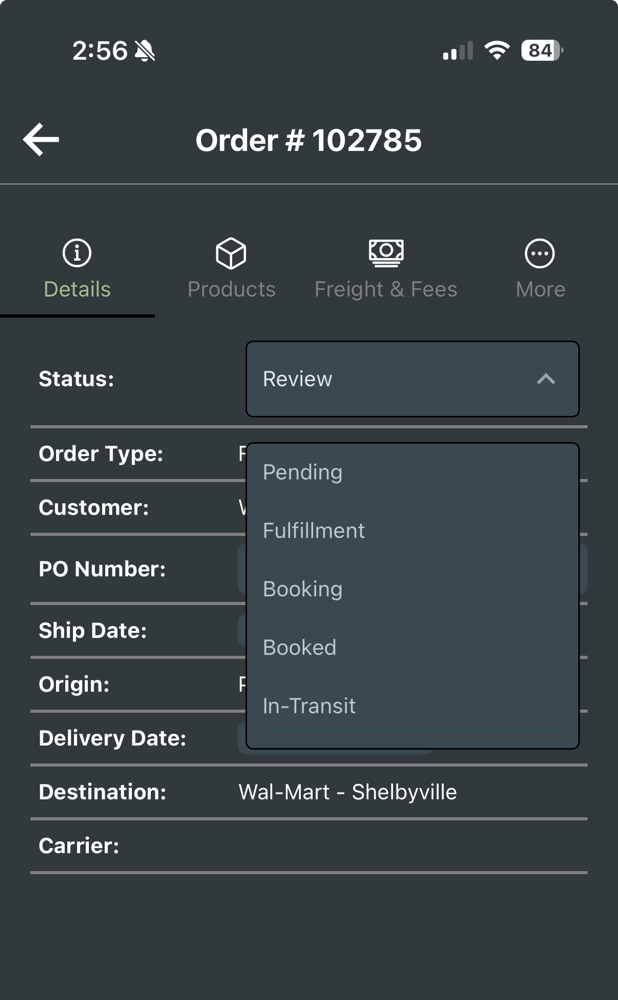
December 2025: Order Status New Options
- There are 2 new Pending type of Order status options: Fulfillment & Review
- These function just like Pending, and include a red color for their label.

December 2025: Product Of Country/State Split
- In an Order and the Load Details, the Product Of now splits out for Country and State.

November 2025: User Restriction on Receiving Origin
- An admin can now set user restrictions to limit the ability to receive from a field or storage.
- In the receiving modal, when a user chooses their Load Type (ie: unfinished, raw, etc.), the next option is to choose the Receive From. If the user setting is restricted, it will automatically select the Receive From dropdown restriction and disable the other option.


November 2025: Inventory Source Displayed
- The Source the inventory was produced from out of the Production Line now shows up in the Grower/Field Info tab in the inventory details.

November 2025: On Hold Order Status Accept Option
- New Order status option of “Accept Order” when you put an order on hold to take it off hold.
- On-Hold Comment show on the order board in the status column.
- If the order is FOB and you accept it, it will go back to Booked status.
- If the order is not FOB and you accept, it will go to Booking status.
November 2025: Auto Fees - Order Types, Company Groups, & Per Qty
- You can now set up an Auto Fee to trigger off of the different Order Types or a Company Group.
- In the Freight & Fee side you can now do Per Qty as a Per option.

November 2025: New Shipper Settlement Document
- This document is fairly close to the shipper confirmation.
- Changes are that it displays each product line with qty and FOB as the money.
- Each product line displays each charge that is tied directly to that line, directly underneath it.
- Contact the Fusionware Sales Dept. to ask about customizing this document for your company.

November 2025: New Freight & Fees Per Options
- New Freight/Fee items.
- Common use would be for commissions based on rates or freight item.
- % Freight Rate
- % of FOB
- % of Total Rate
October 2025: Inventory Board Future Days Loaded Option
- When an Order ships on a future date and has inventory loaded onto that Order, you now have the option to see the qty that’s loaded onto that future order in the new “Ld” column.
- This loaded qty deducts from the Ordered qty
- This is a switch we have to turn on for your company if you want it to appear. Please reach out to have us make the adjustment. There is no extra cost to access this feature.
October 2025: Inventory Board Tool Tips
- When you hover over a column header on the Inventory Board, you will now see a tool tip to help explain the logic for that column.
October 2025: Receiving & Inventory Ref Sync
- In the Receiving Items Ref #, when you update it, that now passes through and updates the Inventory Ref Number.
- This is a one way sync. Updating the Inventory Ref Number will not work back the other way and update the Receiving Item ref #.
October 2025: Auto Fees - Product Cost
- You can now create auto fees based on products you add to orders.
- A grower/vendor is also required along with the product, at a minimum, to trigger the product fee applying to that product line.
October 2025: Confirmation of Sale
- For customers shipping to Canada, and possibly other countries, we have created a new document called “Confirmation of Sale”.
- A template is available for your use in the documents dropdown for orders.
- This differs from the Sales Confirmation document used domestically.
- Please reach out to our sales team if you would like to make adjustments to it.
September 2025: Inventory Board Produced On Manual Adjustment
- Users can now manually change Produced On values

- The Produced On column autofills based on how much was produced for the date selected.
- If you produce that amount every day you can see it reflected in the Projected columns.

- Now you can manually adjust that amount, and it will highlight that row, indicating it was manually adjusted.
- It will update the Projected columns for every day as well.

- Select the “X” to remove the manual adjustment and go back to the default for the date selected.

- After selecting the X the highlight is removed.
September 2025: Document Email Text Update
- In an effort to increase the odds that Fusionware order document emails will go to the receiver’s inbox and not spam, we have changed some language in the subject line and body of the emails.
- We now fully spell out “BOL” in the subject line.
- Added more text and who the email sender is.
- It is best practice to make sure receivers whitelist the Fusionware sending email address.

September 2025: Inventory Board Display Weight
- You can now change the quantity display on the Inventory Board to display as weight.
- Select the Display As Weight checkbox to toggle this on. It defaults to lbs.
- If you have the user setting “Show Weight Display Dropdown in Navbar” selected you can change the display weight in the upper right of your screen from lbs to another weight, like CWT.

September 2025: Inventory Board Export
- There is now an Excel export option to the right of the Order Search and Print button.
September 2025: Mobile Notifications
- Due to text message limitations for notification texts, we have had to disable this feature.
- You are still able to receive Orders update notifications over email.

August 2025: Mobile App Barcode Scanners
- We have calibrated the mobile app to better handle Bluetooth scanners in HID mode.
- This allows a mobile device (phone or tablet) to accept barcode scanning from a Bluetooth barcode scanner in HID mode.
- The benefit is it lets you utilize the Fusionware mobile app on a high quality mobile device, like an iPad, with an inexpensive pocket-size barcode scanner.
Example of an inexpensive unit:

August 2025: Companies Address Tabs Clean Up
- We’ve made changes to make company addresses easier to understand and use in the Customers, Vendors/Growers (Companies) section:
- Billing Address: What was previously called “Physical Address” is now labeled Billing Address. This is the address used on documents by default.
- Mailing Address: If a Mailing Address exists, it will still appear but is now read-only.
- A Clear button lets you remove the old Mailing Address.
- Once cleared, the Mailing Address tab will disappear.

What this means for you
- You no longer need to worry about the difference between “Physical” and “Mail” addresses.
- Your Billing Address will be used automatically on documents.
- If you see an old Mail Address, you can remove it by clicking Clear and put it in the Billing Address Tab.
- The actual origin/destination physical address flows into documents from the location tied to the company on an order, like it always has.
August 2025: Mobile App Order Additions
- Freight & Fees edit in orders on the mobile app now possible.
- Adding new Freight & Fees items is now possible.
Updated add and edit Buttons:

The new Freight & Fee add/edit screen:

August 2025: Mobile App Inventory Enhancements
- You can now update these inventory items on mobile:
- Product Name
- Shipping Date
- Weight
- Quantity
June 2025: Mobile App Updates
- Face ID or Touch ID Login (Pending Mobile app stores approval/release).
- You can enable or disable the option to use biometrics to login on your profile in the mobile app.
- This option is only visible on mobile devices and scanners with biometric capabilities.
- Bug Fixes
- Fixed the issue where some orders were being filtered out in the searches in the evening.
June 2025: Auto Removal of Allocated Inventory
- When inventory is allocated to an order, and you do not load it onto that order the inventory is now removed and set to On Hand.
- This will occur once you:
- Mark the load as Loading Complete
- Or manually move it into the status of In-Transit
- Or if you Cancel or Delete the order.
- Previously, you had to manually Unallocate the inventory to put it back into On Hand status.
June 2025: Support Site Mobile App Training Video
- The mobile app overview training video has been updated with the latest features. It is a complete walkthrough of how to use the mobile app from start to finish.
- You can click HERE to view the video.
May 2025: Mobile App Updates
- Note: You need to download the new mobile app version from your mobile app store for the updates to show up. These new updates to the mobile app may not be live yet as we are waiting for app store approval.
Order Detail Page Redesigned with a Tab layout.

Scan the Order barcode to in the Load Truck screen directly:
- If you have never had adjustments made to your Pick Ticket and are on the default document, then the barcode will show up. If it’s not showing, you will need to reach out to customer support.
- To scan the pick ticket, go into the load truck screen and a scan option now appears.
- At the top of Pick Tickets from Fusionware, they now contain a barcode that you can scan to take you directly into the order on the mobile app.
- This will help forklift drivers or those working off a Pick Ticket to better identify the correct order they are loading and also speed up their search for the order in the mobile app.

- Freight and Fees are now shown on the Order screen.

- The order details buttons are now in the More tab.

- Improved feedback when updating an Order’s product line.
- Order Detail dates are now saved with the correct assigned time.
May 2025: More Spanish Translations
Have added or enhanced Spanish translations: - Order Board - Navbar - Carrier Edit Settings - Assets Settings - User Profile
April 2025: Lot Stacking Warning - Spanish Addition
- If a user has the Spanish language selected in their profile they will see the Spanish translation in the popup warning in the source board when they change/stack a lot.
- How a user can change their language settings:

- How the lot change/stack warning will appear:

April 2025: Order Pallet Tag (ASN/SSCC Tags)
- We have made changes to the order pallet tag process to comply with Walmart’s requirements. Instead of needing to load the product first, we now calculate tags based on the order quantity divided by the units per pallet.
- This allows you to print the order tags at any time.
- Units per pallet are set in the settings for a product and the misc. tab.
- If you only need or want just 1 tag to print then leave the units per pallet blank for the product.
- Video overview HERE of the new changes.
April 2025: Storage Label on Products
- Added the ability to assign a storage to a product.

March 2025: Shipping Modal Departed Time/Date Button
- Added a one-click button to time/date stamp the Departed input on the Shipping Modal.

February 2025: Receivings Updates
- Added clarity and additional date options to Receivings.
- On the Receiving Board added Run Date, Harvest Date, and changed “Date” to show as “Created At”. The Created At date is the date when the receiving is created. It is not adjustable.

- In the Receiving Details we added a new date option for the Harvest Date.
- Changed the name “Date” to what it really is; “Dispatch Date”

January 2025: Add Receiving Number As Lot Number on Unfinished Goods
- We have added the ability to use the receiving number on a receiving as the lot # for an unfinished goods pallet/bin tag.
- This must be turned on by Fusionware Customer Support. Please reach out to us if you are interested.

January 2025: Inventory Board - All Locations Feature
- You can now view all inventory from all locations combined in the Inventory Board.
- A company admin will need to add this privilege to each user that wants to use it.

- The new “All Location” tab with inventory all combined.

- A new “Split by Location” option has been added. When checked you can see the product breakdown by location.

- The other location tabs are still available to look at like normal.

End of 2025 Content
October 2024: Trailer Number Added to Receivings
- In the Carrier Details section inside a receiving, we have added a Trailer Number field

September 2024: Grower Settlements Delete.
- You can now delete Grower Settlements.
September 2024: Multi-Factor Authentication (MFA)
- You can now setup MFA for each user.
- Go to user settings and make sure there is a mobile number.

- Below the mobile number is the option to “Enable” MFA
- Once clicked a modal will pop up that will send you a passcode to the mobile number.

- Enter the passcode.
- Once enabled, every time you log back into Fusionware a security code will be sent to the mobile number to authenticate the login.
August 2024: Mobile App Receiving Create Updates
| Steps | Description - Click on pictures to expand |
|---|---|
| Create Receiving Button | Select Create Receiving in the mobile app. ![]() |
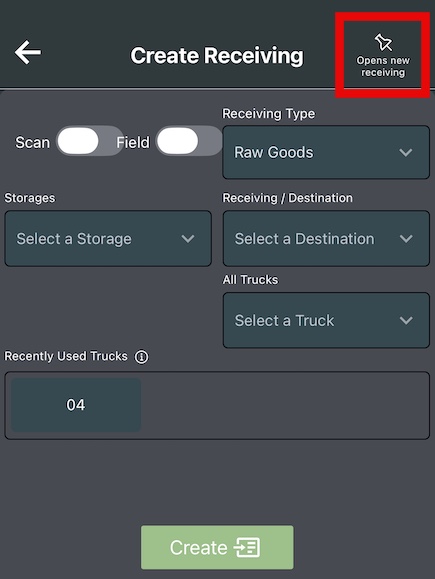
| Header Details | 1. Select the pin to “pin” this page so when you create a receiving it keeps you here and doesn’t take you into the receiving. 2. If your device has a camera or scanner, you can scan location barcodes instead of selecting them. 3. The default is to receive from storage. Select the “field” toggle to receive from a field. ![]() |
| Receiving Details | 1. Select the Storage or Field. 2. Select the destination. 3. Select the lot number. 4. Select the truck number. Then select the “Create” button to create the receiving. ![]() |
| Previous Receivings | The most recently created receiving will show at the top of the list at the bottom of the screen. If you select one of the previous receivings, it will populate all of the details into the new receiving you are trying to create. ![]() |
July 2024: Speed Issues Addressed
- The team has been working on speed issues with the application. There are several causes, mainly around users running large reports repeatedly.
- Measures have been taken and are continually being worked on to keep the database running optimally.
June 2024: Squashed Some Mobile App Bugs
- Continually refining the mobile app and squashing bugs.
June 2024: Order Template Update
- Order Templates now look at live data.
- If you do not have valid/current companies, products, or other items in your template you will now get an error.
June 2024: Mobile App Order Create
- You can now create orders in the mobile app.
- Make sure you have filled out every filled or the order will not create.
- Added the ability to create orders using the template function.
- This is the fastest and easiest way to create an order on the mobile app.
April 2024: Run Profile Quick Add
- On the Production Board we have added a quick add option for creating a new run profile.
- The user profile must have the run profile settings privilege to access or create a run profile.


March 2024: Order Traceability Tab Enhancements
- Added a hyperlink to the lot/field in the traceability tab on an order.
- If you have “auto incrementing lot numbers” for your production a new column will show up with “Production Lot #”.

March 2024: Production Board Privileges
- An Admin can now restrict access to specific Production Lines on the Production Board
- The user must have the Source Location with the Production Lines they need access to
- Previously, if a user had the Source Location added to their user then they had access to all Production Lines and there was no way to restrict that

An Admin can now go into Settings >> Users >> Sub-Privileges and then select Production Lines for the Type and for the Permission Type the name of the Production Line and select it. Add the permission with the green plus button.

The user will now only see the Production Lines assigned to them in the Sub-Privileges. If you do not have any Sub-Privileges and they have Production Board permissions and the Source Location, they will still see all the Production Lines.

February 2024: Order Details Edit Warning
- In an order, if you select the shortcut to edit the Customer, Origin, or Destination you will now see a warning that you are not changing the company or location for the order but editing the settings for those items
- Newer users mistaking think these shortcuts are how you change the Customer or Locations on an order and it changes the master information in the settings

February 2024: Mobile App Dumping Into Source
- You can now dump into a source in the mobile app
- In the mobile app this functionality, located in the “Grade/Size/Pack” button, will allow you to use your phone camera or Android hand scanner to scan your pallets as you dump them into your production lines


February 2024: Download Button
- Download buttons are changing throughout the app to a dropdown selection instead of a green button
- Here is what it looks like in the Booking Summary

February 2024: Send Driver Signature Shortcut
- On the Shipping Board, in the modal pop-out on an order, we have added the send driver signature option.

January 2024: Order Details Toggle Update
- We have updated the button option to change the layout inside of an order.
- It is now just a toggle that shows grey if you are in the default view and green if you are in the alternate view.

January 2024: Bulk Order Origin Update
- Added the ability to bulk update the Origin on multiple orders on the Order Board.

- Select the check box next to the orders on the Order Board you want to bulk update the origins on and then select the options button.
- Select the Change Origins button.

- In the modal pop-up, type and select the origin you want to update to and press confirm.
End of 2025 Content
December 2023: Manual Lot Selection on the Production Board
- You now have the ability to manually select a lot on the production board without having to receive inventory and assign or dump it into a source.
- The field the lot is under also has to be assigned to your packing shed location.
- DO NOT use this feature if you are trying to track your dumped or received weights.
- Go to the Production Board section of the support site HERE to learn more.

November 2023: Pick Ticket Sent Icon
- Once you have printed and/or emailed a Pick Ticket a “PT” icon will show next to the order on the Order & Shipping Boards.
![]()
November 2023: Order Log Additions
- Added Product Change Section to Order Logs to track users adding/deleting products
- Added Freight Fee Change Section to Order Logs to track users adding/deleting freight & fees

November 2023: Order Board Bulk Date Updates
Added the ability to bulk update ship and delivery dates on orders.
Select the orders you want to update.

Select the blue options button and select either the change ship date or change delivery date option.

Pick the date & time to update for all the selected orders.

October 2023: Order Board speed improvements and backend improvements.
September 2023 Webinar: Orders Tips & Transportation Integrations
- Webinar page on the support site HERE with the past webinar recordings and upcoming information.
August 2023: Order Board Options Drop Up Menu
- The Order Board options button at the bottom of the Order Board now will always sit down lower on the page, regardless of the number of orders.
- The placement resolved an issue on the order board when you only have a couple orders showing and select the blue Options button on the lower left of the page that it cut off some of the options.

August 2023: Bulk Order Updates
- In addition to bulk Delete and bulk Accept for multiple orders at a time on the order board, we have now added two other bulk order status change options:
- Paid In Full
- Cancel Orders
- On the order board select all the orders you want to bulk change. Select options in the lower left for the menu of options to show up.
- There may be a delay of a few seconds to process the change, depending on the number of orders you are changing the status on.
- If you don’t see the Options button you will need to have a company admin add this privilege to your user settings.

August 2023: Carriers Page State/Country Columns
- The State/Country column is now separated into two separate columns
- You now can sort the page by either the state or country to just see carriers in a specific state or country

August 2023: Auto Fees Settings
- Updated the Auto Fees add/edit to indicate what is required and what must be selected.
- Changed the layout into 3 columns and simplified the process.
- Auto Fees are found in Settings >> Orders Dropdown >> Auto Fees

June 2023: Order Board Line
- When you sort the Order Board by the Ship Date, a black line now appears between the different ship dates.

June 2023 Webinar: User Permissions & Settings
- Webinar page on the support site HERE with the past webinar recordings and upcoming information.
June 2023: Country Code Check on Fax Numbers
- If you try to save a fax number to a company contact we now check for the country code for United States and Canada.
- If you try to save a fax number or send a document to a fax number and don’t have a prepending country code you will see this error:

May 2023: Webinars
- We now have monthly webinars to cover trainings on specific aspects of Fusionware.
- We have a new Webinar page on the support site HERE with details on upcoming webinars, how to join, and past webinar recordings.
May 2023: Rounding Precision
- In the Company Profile you can adjust the rounding precision on the order (admin rights required).
- Go to: Settings >> Company Profile

Tool Tips have been added so you know exactly which numbers the rounding is affecting on the order.

What the tool tips (question marks) reveal when you click on them:
- Total Rounding Precision:
- The numeric value entered in this input will control the amount of decimal places the system will round and display for product profit, product total, and freight and fee totals.”
- Qty Rounding Precision:
- The numeric value entered in this input will control the amount of decimal places the system will round and display for product line quantities, as well as quantities on freight and fee lines.
- Rate Rounding Precision:
- The numeric value entered in this input will control the amount of decimal places the system will round and display for product line FOB rate, product line freight & fees, product line total rate, and the rates on freights and fee lines.
May 2023: Shipping Board Modal Updates
- In the modal in an order on the Shipping Board, in the “Adv.” section, we made some updates:
- Added “Trailer Tandems”, which is a calculated weight.
- Changed “Drives” to “Steers & Drives”.
- Changed “Axles” to “Drives” and changed it to a calculation.

April 2023: Inventory Report Column Add
- Added “Order #” to the list of columns you can add/hide on the Inventory Report
April 2023: How do I add a Product to a Run Profile & Production Line
- Added the 3 steps to the FAQ page here permanently or find the details below:
April 2023: Order Level Inventory Management
- In the Traceability tab of an order you are now able to adjust pallet/inventory qty. at a Lot/Block/Storage level after the order has shipped.
| Steps | Description - Click on pictures to expand |
|---|---|
| Order >> Traceability Tab | In the order details select the traceability tab to make inventory adjustments after you have shipped an order. ![]() |
| Adjustment Qty Column | Fill in the amount of items to remove from a pallet, based on Field Lot# / Bock Id /Storage. ![]() |
| Multiple Pallets | If there are multiple pallets/inventory items, and you fill in more to deduct then what is on a single pallet, the deduction will carry over to the next inventory item for that same Lot/Block/Storage. ![]() |
| Products Line Adj. | On the Product lines you will see the “Adj. Qty” is now updated to reflect the amount you adjusted on the inventory. This may require a page refresh. ![]() |
| Error Issues | If a pallet has 2 separate lots on it, like this inventory 17535235 does in red, the Adjustment Qty. input will be disabled for the two different lots and the Shipped Qty will show split up. ![]() |
| Inventory Adj. | Select the inventory id # and adjust the quantity for that pallet in the Inventory Details section. The amount will be divided between the two different lots based on how it was produced on the production line. ![]() |
February 2023: Mobile App - Pictures/Documents Orders Upload
- We have added the ability to upload images to an order through the mobile app.
| Steps | Description - Click on pictures to expand |
|---|---|
| Document Button | In the Orders section of the mobile app select the “Documents” button on the order you want to upload pictures to. ![]() |
| Upload Option | Select from your Camera and take a picture or upload from you Photo Library on your device. ![]() |
| File Name | Before uploading the picture you can rename the file. Select the “Upload” button. ![]() |
| Documents Preview | When in an order with documents or pictures you can select the Documents button and see the file names, upload dates and the submitting users. ![]() |
| Web Application Documents | On a web browser in an order if you select the “Documents” tab you can select on the file name and it will open the image. You also have the option to email, download, or delete documents/images from the web application of Fusionware. ![]() |
February 2023: General System Speed Improvements
- There have been numerous improvements made to speed up the system.
- If you have large amounts of inventory you will notice major speed improvements on the Inventory Board specifically.
January 2023: Inventory Report Date Type
- There is now an option to select the date type for the filters on the Inventory Report
- This new filter will allow for more precise filtering and customization
| Steps | Description - Click on pictures to expand |
|---|---|
| Date Type | Inventory Report now shows what the date search is filtering on. The default is Pack Date. ![]() |
| Date Options | Filter by: Pack, Dump, Ship, or Delete Date. ![]() |
| Example | Say you want to look at a date range between 10/17/22 and 12/29/22 for all the Shipped inventory with a Pack Date in this time frame. This filter will allow you to do that instead of looking at just the Shipped Date like it did before. This means you can narrow down your date parameters and dial in your search criteria more precisely. ![]() |
January 2023: Pallet Tag Multi-Print
- Create & Print up to 25 Pallet Tags from the Production Board at a time
- Please contact Fusionware Support to turn this permission on for your company

| Steps | Description - Click on pictures to expand |
|---|---|
| Select Label | Enter the number of tags to create in the “# of Pallets” column and select the label to print. Confirm you want to print that quantity. ![]() |
| White Pop-Up | It could take several seconds for the print window to appear. ![]() |
| Green Success Pop-Up | Pallet Tag numbers will be listed once the tags have been generated. ![]() |
| Print Pop-Up | In the print window the number of pages will equal how many pallet tags you entered to be generated. ![]() |
| Red Warning Pop-Up | The maximum number you can create is 25 at a time. If you enter more than 25 at a time a red warning will appear and it will default down to 25 for the number to create. ![]() |
January 2023: Mobile App Order Management Feature Launched Click Here
End of 2023 Content
December 2022: Mobile App Load Truck Feature Launched Click Here
December 2022: Shipping Board Documents Condensed:
- Documents are now combined on the Shipping Board into a dropdown

- The Shipping Manifest has been added as as document option.

November 2022: New Inventory Report “All Active” filter:
- You now have the option to select a new “All Active” filter that will exclude the Deleted or Dumped inventory.

- The tool tip shows what the “All Active” includes and excludes on the report.

- Like previously, if you click on the gray highlighted filter indicator box to de-select the filters then all inventory items will still display.

November 2022: Sending Multiple Documents From an Order
Send multiple documents previously sent or saved, in one email to one or more recipients.
| Steps | Description - Click on pictures to expand |
|---|---|
| Order Details >> Documents Tab | Every time you print or email a document it saves a copy of that document. Go to the documents tab, select all the documents previously printed or emailed, select Options and then Email ![]() |
| Select Recipients | Select a Customer, Origin, or Destination contact. You can also manually type in a name and email for a new contact. Your user email will always show as an option to select as well. Click Send. ![]() |
| Zip File | The documents will then be emailed and attached as PDF files in a zip folder to all selected recipients. ![]() |
November 2022: PC Miler Integration
- Use PC Miler to calculate any mileage calculations in Fusionware instead of our built in Google Maps calculations.
- Additional charges may apply.
- Please Contact a Fusionware Support to get started.
November 2022: Shipping Manifest Print On Shipping Modal
- You can now print the Shipping Manifest in the Shipping Board on the Shipping Modal

November 2022: Drivers Lic.# Added to Shipping Modal
- On the Shipping Board in the Shipping Modal, the Driver’s Lic. # has been added.
- Users can now add/edit the Lic.# from here or the Order Details in the Order Board.
- “Driver” has now been added to the words “Mobile” and “Lic.#” to make it clear these belong to the Driver.

October 2022: Locations Quick Add
In Companies you can now do a quick add of Locations.
Previously it was required to go into Locations, create the location, then go into the Companies section and tie it back to the main parent/billing company.
| Steps | Description - Click on pictures to expand |
|---|---|
| Settings >> Customers/Vendors/Growers | ![]() |
| Select A Company, Then Locations Tab | Type in the new Location name that you want to add to that Company. Press the green plus sign. A prompt will pop-up to add the new Location. Select Yes. ![]() |
| Add The New Location Data | A new window will pop up to do a quick add for the basic Location information. Select Create at the bottom of the quick add window. ![]() |
| Location Details | A new tab will open in your browser and allow you to add all the additional Location details you need. The new Location is now added and tied to the Company. ![]() |
October 2022: New “Simple Production Board” Launched
- Create inventory in a new Simple way.
- Must be added to your Company by Fusionware Support and then a Company Admin can add it to each User.
| Steps | Description - Click on pictures to expand |
|---|---|
| Go to the Boards Dropdown | When turned on, the user will see “Advanced Production Board” for the original Production Board and will also have a new option for “Simple Production Board.” ![]() |
| Simple Production Board | Type or scan a Product in. To more fully automate the process, you can tie GS1 numbers from finished Products that have barcodes on their packaging. Then a user can scan the barcode and it will populate the product without typing. ![]() |
| Verify Product Info & Adjust Quantity | Select Create to produce a pallet of goods. ![]() |
| Pallet Tag | The print job will pop-up and you will see a success message that the inventory was created, in the upper right hand corner of the screen. You are then returned to the main screen ready to input a new product and create another pallet. ![]() |
October 2022: Driver Update on Carriers
Fusionware users can now be auto filled into the Drivers section for a Carrier.
| Steps | Description - Click on pictures to expand |
|---|---|
| Go to SeeCarriers | ![]() |
| Driver Tab Of A Carrier | ![]() |
| Add External Driver | External driver is set by default. All fields are free form text. ![]() |
| Toggle “Fusion User” | Select the box to switch to finding a Fusionware user to add. ![]() |
| Select the Fusion User | Start typing their name and they will appear in the dropdown. Select the Fusionware user and their name and phone number will auto-populate the fields. Press the green plus button to add the Driver. ![]() |
| Identifying Driver Types | ![]() |
October 2022: Carriers & Drivers Linked on Orders
Drivers are now linked in Orders to Carriers
| Steps | Description - Click on pictures to expand |
|---|---|
| Add Drivers to a Carrier | ![]() |
| Add a Carrier to an Order | If the Carrier has a Driver tied to it the Driver field becomes a searchable field. Start typing the Driver’s name and then select it. The Drivers phone number will auto populate. ![]() |
If the Carrier added to an order does not have a Driver tied to it the Driver field in an order will remain a free form text field and you can type in whatever name you want manually.
September 2022: Receiving Ticket User Signature
A user that creates a Receiving on the web or mobile application can now have their user signature apply to the Receiving Ticket. This will need to be setup/customized for your company’s Receiving Ticket, please contact Fusionware to learn more.

September 2022: Order Board Suggested Rate Edit
On the Order Board you can now update the Suggested Rate for hauling on an Order. A company admin will need to add the Privilege and Column Display to your user profile for this to show up:
- Privileges tab: Order Board > Edit Suggested Rate
- Column Display tab: Order Board > Suggested Rate

September 2022: Inventory Report Refresh Button
On the right side of the page on the Inventory Report we have added a Refresh Button. This will allow you to refresh the inventory information without having to refresh the entire webpage and lose your filter selections.

August 2022: “Single” Shipper Confirmation Document
Added a new version of the Shipper Confirmation called “Single Shipper Confirmation”. This document can be produced when you have multiple destinations but want only one Shipper Confirmation produced with all the destinations and products on it.

August 2022: Carrier Details “Shipment Type” update to Orders
Inside an order in the Carrier Details section we now have a dropdown option for the Shipment Type. You can identify the carrier method as a “Single” driver, “Team” driver situation, or “Train” car. This can be useful when trying to identify estimated delivery dates and help identify certain shipping costs/methods.

July 2022: Expanded Mobile App Receiving Features To Now Include Receiving From the Field
July 2022: Added Asset Light Weight Default
You can now assign a light weight to an asset so that it will auto populate the light weight for that asset on a receiving. This must be turned on by the Fusionware Support team for your company’s Fusionware account This is designed primarily so you can assign a light weight to each of your trucks.
| Step | Description - Click on pictures to expand |
|---|---|
| Settings: Assets | ![]() |
| Select the Asset Enter the default light weight for the asset | ![]() |
| Add Receiving When creating a new receiving enter the Truck Number (the asset) and the light weight will automatically pull in | ![]() |
June 2022: Added Mobile App Permissions:
Permissions have now been added to the mobile app based on each user’s Privileges. Go to: Settings > User Settings > Privileges > Mobile. Select the privileges needed for the user. The user will also need access to the different Boards that are tied to the area of the mobile app they are trying to access. For example, if a user needs to move inventory in the mobile app they will need to have access to the Inventory Board in their privileges.

May 2022: Added PO #’s to Order Search:
Users now can type in an Order # or PO # into the Order Search and go directly into the order.

May 2022: Fusion To Fusion
Fusion to Fusion gives you the ability to automatically send or receive orders with another company that uses Fusionware. Currently, you can setup one vendor to receive orders from and one customer to send orders to. The Fusion To Fusion Support Page: Click Here Please contact Fusionware Support to get started
April 2022: Integrations Updates:
TMS - My Carrier Packets Integration Click Here
TMS - MacroPoint Integration Click Here
Farm Planning - John Deere Integration Click Here
Scale Integrations Click Here
April 2022: Order Pallet Tag Walmart Update
| Order Pallet Tag Steps | Description - Click on pictures to expand |
|---|---|
| In Order Details: Create Walmart Pallet Tag | This is done AFTER you have loaded the truck and added all your inventory to the order |
| Step 1 Setup the Customer you want the Walmart Pallet Tag Option for | You can do that ahead of time in “Customers,Vendors/Growers” or simply select the Cust. button inside the order ![]() |
| Step 2 Select the Order Pallet Label & select “Walmart” | ![]() |
| Step 3 In the Order Details Select Documents & “Order Pallet Tag | ![]() |
| Step 4 Print the Order Pallet Tag | ![]() |
| How it Works | This does not interfere with your inventory pallet tags. This is simply based on the Order itself and the number of pallets that you have on your Pallet Layout. This order has 3 pallets so 3 labels were produced ![]() |
March 2022: Carrier Flag
| Carrier Flag Updates | Description - Click on video to play, click on pictures to expand |
|---|---|
| 1 of 7 Carrier Flag added Is Carrier option to Add New Company section | ![]() |
| 2 of 7 Carrier Search Filters Added a “Is Flagged” filter in the Carriers section | ![]() |
| 3 of 7 Carrier Flag In the Carrier Board/section added a “Carrier is Flagged” exclamation point if the carrier is marked as Flagged | ![]() |
| 4 of 7 Carrier Flag Added exclamation point to the Order & Shipping Boards if the Carrier is Flagged | ![]() |
| 5 of 7 Carrier Flag In Order Details, if the Carrier is Flagged a warning pops out and the Carrier field stays red | ![]() |
| 6 of 7 Carrier Flag In Order Details Order Log, if the Carrier is Flagged it logs who placed the Flagged Carrier on the order | ![]() |
| 7 of 7 Carrier Flag In the Shipping Board on the Truck Check-In & Load Out modal, Carrier Name and box are red if the Carrier is Flagged | ![]() |
| Update | Description - Click on video to play, click on pictures to expand |
|---|---|
| Contract Mar. 2022 Update | Moved the Contract dropdown to the bottom of Add Order modal. Also added the ability now to select an Advanced Contract, based off previously selected items in Add Order. ![]() |
| Mobile App March 2022 Update | |
| Added Mobile App Page to Support Page Feb. 2022 | https://support.fusionware.com/mobile/ |
| Inventory Board Feb. 2022 Update | https://share.vidyard.com/watch/hkozPuEC7zQvfGTqZ1jCAR? |
| Update | Description - Click on video to play, click on pictures to expand |
|---|---|
| Support Page Reports Page 1/13/22 Update | Added support information in Reports > Custom on how to access Power BI reports and utilize the Recall Report. |
| Support Page 1/3/22 Update | |
| Navigation Bar 9/21/21 Update |