Column Display
Settings » Misc. » Users » Column Display
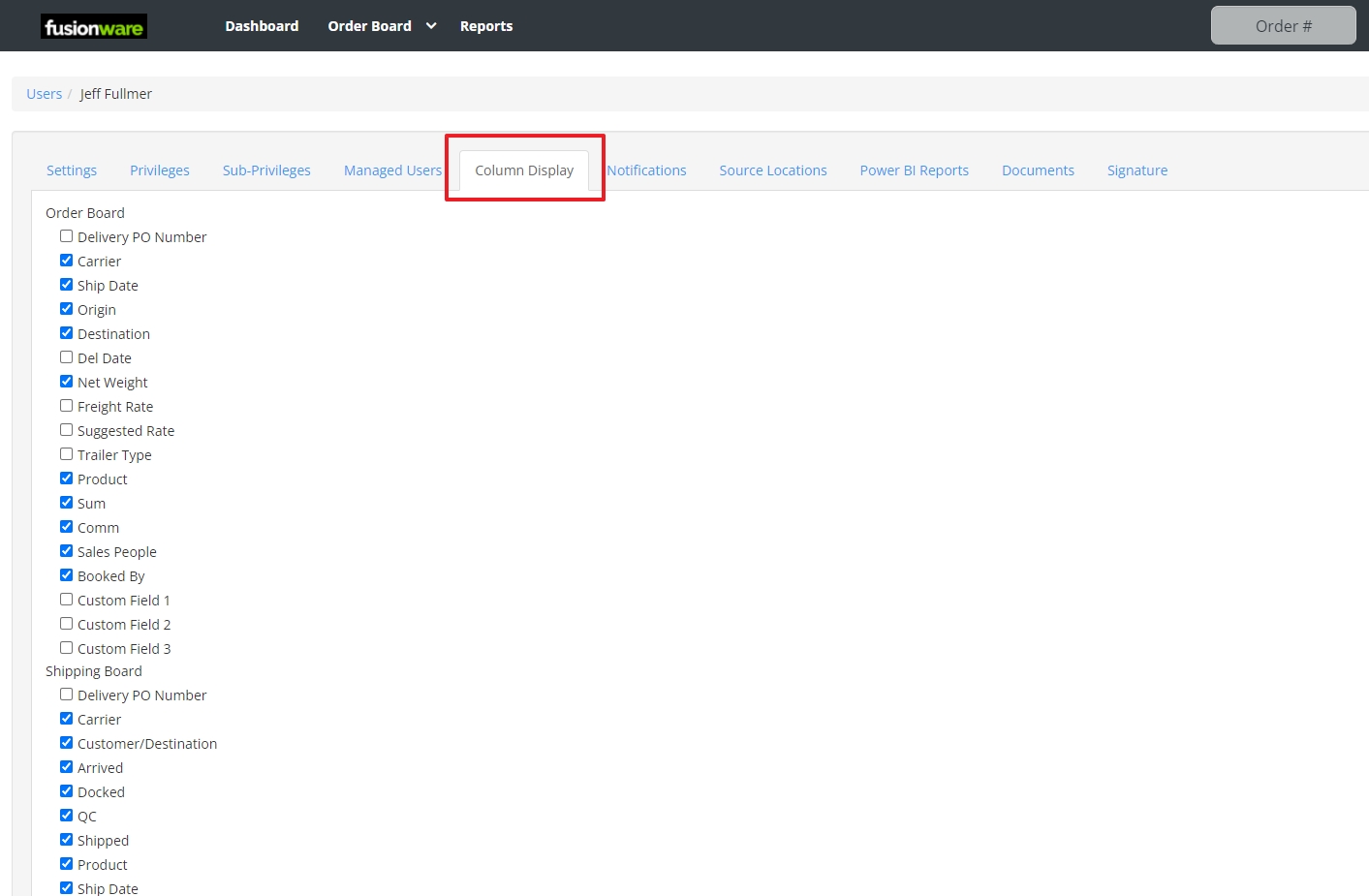
The Column Display tab controls which columns show up in the grid for a given board when this user views it. Unlike the Privileges tab, these checkboxes don’t unlock a page — they just show or hide one column on a board that the user can already access. Columns are grouped by board and listed in the same order they appear on the page.
| Field Name | Description |
|---|---|
| Order Board | Controls which columns appear in the user’s Order Board grid |
| 1. Order Board - Delivery PO Number | Shows the customer’s delivery purchase order number column |
| 2. Order Board - Freight Number | Shows the freight invoice number column; only appears for customers billed on external freight |
| 3. Order Board - Carrier | Shows the assigned carrier’s name column |
| 4. Order Board - Ship Date | Shows the scheduled ship date column |
| 5. Order Board - Origin | Shows the shipping origin location column |
| 6. Order Board - Destination | Shows the delivery destination column |
| 7. Order Board - Del Date | Shows the scheduled delivery date column |
| 8. Order Board - Net Weight | Shows the net product weight column |
| 9. Order Board - Freight Rate | Shows the freight cost rate column |
| 10. Order Board - Suggested Rate | Shows the system-suggested freight rate column |
| 11. Order Board - Trailer Type | Shows the required trailer type column |
| 12. Order Board - Product | Shows the product/commodity column |
| 13. Order Board - Sum | Shows the order’s total dollar amount column |
| 14. Order Board - Comm | Shows the order comments column |
| 15. Order Board - Sales People | Shows the assigned sales rep column |
| 16. Order Board - Booked By | Shows the column naming the user who booked the order |
| 17. Order Board - Custom Field 1 | Shows the first customer-configurable custom field column |
| 18. Order Board - Custom Field 2 | Shows the second customer-configurable custom field column |
| 19. Order Board - Custom Field 3 | Shows the third customer-configurable custom field column |
| Shipping Board | Controls which columns appear in the user’s Shipping Board grid |
| 1. Shipping Board - Delivery PO Number | Shows the customer’s delivery purchase order number column |
| 2. Shipping Board - Freight Number | Shows the freight invoice number column; only appears for customers billed on external freight |
| 3. Shipping Board - Carrier | Shows the assigned carrier’s name column |
| 4. Shipping Board - Customer/Destination | Shows the combined customer name and destination column |
| 5. Shipping Board - Arrived | Shows the checkbox column marking whether the load has arrived at origin |
| 6. Shipping Board - Docked | Shows the checkbox column marking whether the trailer is docked and ready to load |
| 7. Shipping Board - QC | Shows the quality-control status column for the shipment |
| 8. Shipping Board - Shipped | Shows the checkbox column marking whether the load has shipped |
| 9. Shipping Board - Product | Shows the product/commodity column |
| 10. Shipping Board - Ship Date | Shows the scheduled ship date column |
| 11. Shipping Board - Tracking | Shows the carrier tracking number/link column |
| 12. Shipping Board - Arrive ETA | Shows the estimated arrival time column |
| 13. Shipping Board - Departed Date | Shows the date/time the load actually departed |
| 14. Shipping Board - Depart By | Shows the deadline time the load needs to depart by |
| 15. Shipping Board - Del. Date | Shows the scheduled delivery date column |
| 16. Shipping Board - Origins | Shows the shipping origin location(s) column |
| 17. Shipping Board - Ship Qty | Shows the quantity being shipped column |
| 18. Shipping Board - Weight | Shows the shipment weight column |
| 19. Shipping Board - Contract | Shows the checkbox column marking whether the shipment is tied to a grower/customer contract |
| 20. Shipping Board - Comments | Shows the internal comments column for the shipment |
| 21. Shipping Board - Custom Field 1 | Shows the first customer-configurable custom field column |
| 22. Shipping Board - Custom Field 2 | Shows the second customer-configurable custom field column |
| 23. Shipping Board - Custom Field 3 | Shows the third customer-configurable custom field column |
| Inventory Report | Controls which columns appear in the user’s Inventory report grid |
| 1. Inventory Report - Order # | Shows the linked order number column, if the inventory is tied to an order |
| 2. Inventory Report - Field Name | Shows the grower field the product was grown in |
| 3. Inventory Report - Ref Number | Shows the ERP reference number column for the inventory record |
| 4. Inventory Report - Product ERP Ref | Shows the product’s ERP reference code column |
| 5. Inventory Report - Product Xref | Shows the product’s cross-reference code column, used to map to an external system’s product code |
| 6. Inventory Report - Printer | Shows which label printer is assigned to the inventory item |
| 7. Inventory Report - Grower | Shows the grower/vendor the product came from |
| 8. Inventory Report - Packed At | Shows the date/time the product was packed |
| 9. Inventory Report - Original Pack Date | Shows the item’s original pack date, preserved even if the inventory record is later split or moved |
| 10. Inventory Report - Destination | Shows the intended delivery destination column |
| 11. Inventory Report - Product Variety | Shows the product variety column |
| 12. Inventory Report - Product Commodity | Shows the product’s top-level commodity type column |
| 13. Inventory Report - Current Location | Shows the item’s current storage location column |
| 14. Inventory Report - Production Line | Shows which production line packed the item |
| 15. Inventory Report - Pallet Type | Shows the pallet configuration type column |
| 16. Inventory Report - Dispatch Date | Shows the date/time the item was dispatched for shipment |
| Receiving Board | Controls which columns appear in the user’s Receiving Board grid |
| 1. Receiving Board - Created At | Shows the date/time the receiving record was created |
| 2. Receiving Board - Ref # | Shows the receiving ticket’s reference number column |
| 3. Receiving Board - Run Date | Shows the date/time the load was run through receiving |
| 4. Receiving Board - Dispatch | Shows the date/time the load was dispatched from the field |
| 5. Receiving Board - Harvest Date | Shows the date/time the product was harvested |
| 6. Receiving Board - Lots | Shows the lot number(s) created from this receiving |
| 7. Receiving Board - Field Block # | Shows the grower’s field/block number the product came from |
| 8. Receiving Board - Growers | Shows the grower company column |
| 9. Receiving Board - Location | Shows the receiving/storage location column |
| 10. Receiving Board - Commodity Product | Shows the commodity/product type received |
| 11. Receiving Board - Qty | Shows the quantity received column |
| 12. Receiving Board - Weight | Shows the weight received column |
| 13. Receiving Board - Truck # | Shows the delivering truck’s number column |
| 14. Receiving Board - Driver | Shows the driver name column |
| 15. Receiving Board - Foreman | Shows the harvest crew foreman’s name column |